Jira Cloud · by PuzariCloud, makers of BulkPulse for Jira · facts checked 8 November 2026
What Jira Cloud does natively
Jira Cloud can clone one issue at a time (••• → Clone on the issue), but Bulk change has no clone operation. Adding it is JRACLOUD-37520, one of the most-voted Jira Cloud requests: 1,756 votes, open since 2014.
Native workarounds:
Jira Automation. A rule with a clone action, run on the issues of a JQL query, can do it. It works, but you build and test a rule for each job, and runs count against your plan's automation limits.
CSV export and import. Export the issues, then import them as new ones. It's slow, and it's easy to get field mapping wrong.
Clone one by one, which is fine for three issues and painful for fifty.
Step by step with BulkPulse for Jira
BulkPulse adds bulk actions to Jira, including Clone. You pick the issues with JQL, preview the result, and run it with your own Jira permissions.
Open Apps → BulkPulse in Jira's top navigation (or Bulk actions in a project's sidebar).
Type a JQL query, for example project = OPS AND sprint in openSprints(), and click Find issues. Run on all matching issues or tick the ones you want.
Choose the action Clone. Pick the target project (the same one by default), the summary prefix (default CLONE - ), what to copy (description, labels, priority, components, assignee, fix versions, due date) and whether each clone links back to its original.
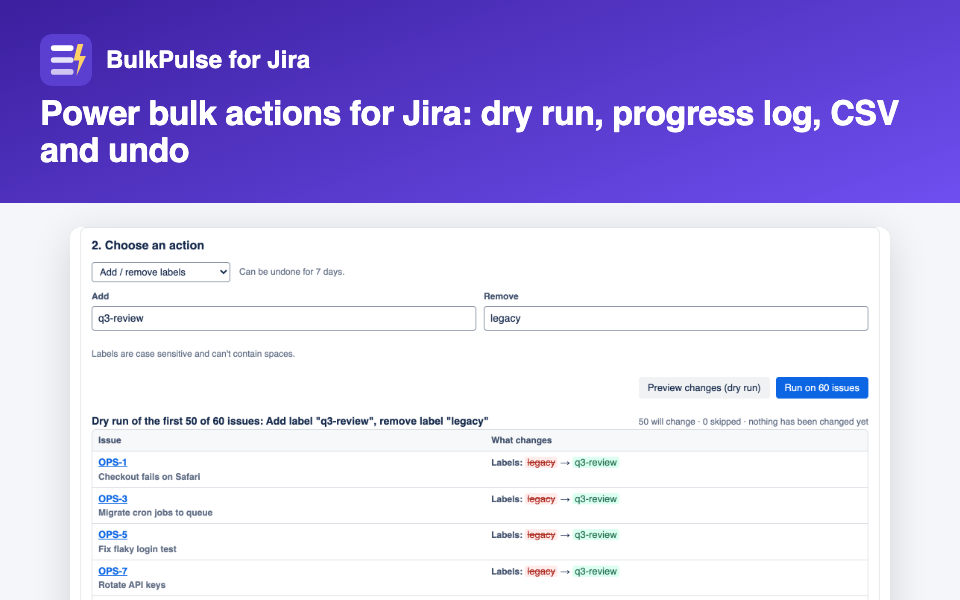
Click Preview changes (dry run). It lists the first 50 issues and what will happen to each, or why one will be skipped. Nothing is created yet.
The dry run, shown here for a label change. Clone previews work the same way.
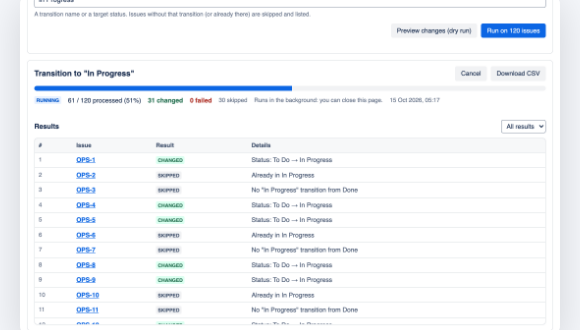
Click Run. Up to 50 issues run from the page; bigger jobs run in the background with a progress bar and a per-issue log you can download as CSV.
A background job with its per-issue results, shown here for a transition.
Limits, to be upfront
Clones get the standard fields listed above, not custom fields, attachments or sub-tasks.
Components and fix versions are copied only when cloning into the same project. Sub-tasks can only be cloned within their own project.
Up to 1,000 issues per bulk change; split larger sets with JQL.
Clones can't be undone with BulkPulse's undo (that covers labels, components, fields and fix versions). Delete them in bulk if needed.
BulkPulse for Jira is built on Atlassian Forge, runs on Atlassian and is free for up to 10 users. Full instructions are in the BulkPulse for Jira help.
Questions
Can Jira Cloud clone issues in bulk natively?
No. Bulk change has no clone operation (JRACLOUD-37520). You can use an Automation rule, CSV export and import, or an app.
Can I clone into another project?
Yes. Choose a target project; the clones use the same issue type name there. Components and fix versions are only copied within the same project.
Are clones linked to the originals?
By default yes, with Jira's Cloners link type. You can turn it off.
Whose permissions are used?
Yours. BulkPulse makes every change as you, so it can only do what your Jira permissions allow.
How much does BulkPulse cost?
It is free for up to 10 users; larger sites pay per user through the Atlassian Marketplace.
We make BulkPulse for Jira, so we've stuck to what you can check: the feature request on jira.atlassian.com, the app's listing and its help page. Facts checked 8 November 2026. Support: support@puzaricloud.in. Not affiliated with Atlassian.