Jira Cloud · by PuzariCloud, makers of PivotPulse for Jira · facts checked 8 November 2026
What Jira Cloud does natively
In Jira, an issue's Σ Time spent includes its sub-tasks, but an epic doesn't add up the time logged on its child stories and tasks. The request to relate the time tracking report to epics and their children, JRACLOUD-90262, has 126 votes.
Native workarounds:
Issue search: search parent = EPIC-1, add the Time spent column and add it up yourself (or export and sum in a spreadsheet), one epic at a time.
Automation rules that copy totals into a field on the epic. They take maintenance and drift when work is logged later.
Step by step with PivotPulse for Jira
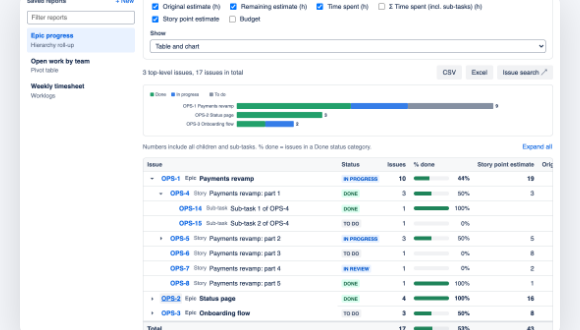
PivotPulse has a hierarchy roll-up report: give it a JQL query that returns epics and it lists each epic with its child issues and their sub-tasks, sums time spent, estimates and story points up the tree, and shows % done. It also has a worklog report of hours by person, epic or issue per week or month.
Install PivotPulse and open Apps → Reports (or Reports in a project's sidebar).
Choose the report type Hierarchy roll-up and enter a query that returns the epics, for example issuetype = Epic AND project = OPS.
Pick the numbers to sum: Time spent, original estimate, remaining estimate, story points. Use plain Time spent rather than Σ Time spent here, because the roll-up already adds the sub-tasks.
Run it. Each epic shows its totals and a % done bar; expand an epic to see its stories and sub-tasks. Click an issue key to open it with its children.
Epic roll-up: stories and sub-tasks in one tree, with % done and the chosen numbers summed.
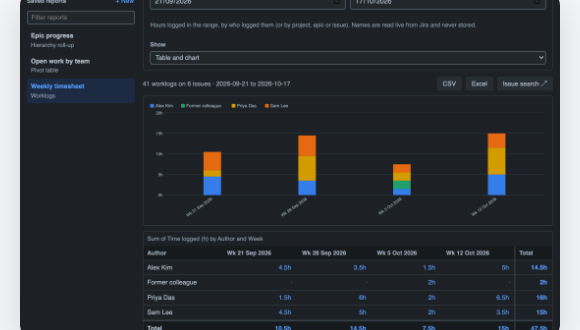
For hours in a date range, choose Worklogs and group by epic or by person per week or month. Export either report to CSV or Excel, or save it and add it to a dashboard.
Worklog report: hours per person per week.
Limits, to be upfront
Up to 5,000 issues per report, children included, and up to three levels below the top issues.
The roll-up adds each issue's own value to its children's, so an estimate entered on both a story and its sub-tasks is counted at both levels.
Time fields are shown in hours. Time in status, cascading select fields and formulas are not in this version.
PivotPulse for Jira is built on Atlassian Forge, runs on Atlassian and is free for up to 10 users. Full instructions are in the PivotPulse for Jira help.
Questions
Why doesn't an epic show the time logged on its stories?
Jira's Σ (aggregate) time fields only include sub-tasks, not the child issues of an epic (JRACLOUD-90262).
Can I see time logged per epic for last month?
Yes. PivotPulse's Worklogs report shows hours by epic (or person, project or issue) per day, week or month in a date range you choose.
Can I export the report?
Yes, to CSV or Excel (.xlsx), with hours as numbers.
Is my data stored?
Issues and worklogs are read in your browser with your permissions and not stored. Only saved report definitions are kept, in Forge storage on Atlassian.
How much does PivotPulse cost?
It is free for up to 10 users; larger sites pay per user through the Atlassian Marketplace.
We make PivotPulse for Jira, so we've stuck to what you can check: the feature request on jira.atlassian.com, the app's listing and its help page. Facts checked 8 November 2026. Support: support@puzaricloud.in. Not affiliated with Atlassian.