How to filter the Jira activity stream by JQL or a saved filter
Jira Cloud · by PuzariCloud, makers of StreamPulse for Jira · facts checked 8 November 2026
What Jira Cloud does natively
Jira's built-in Activity Stream dashboard gadget filters by things like project, user, issue key and date, but it can't follow a JQL query or a saved filter. That request, JRACLOUD-19155, has 277 votes and has been open since 2009.
Native workarounds:
Narrow the Activity Stream by project and user and accept the extra noise.
Filter subscriptions email you the issues of a saved filter on a schedule, but they list issues, not what changed on them.
The issue history of each issue shows every change, one issue at a time.
Step by step with StreamPulse for Jira
StreamPulse is a dashboard gadget that shows the activity on the issues of any JQL query or saved filter: new issues, transitions, field changes, comments and work logged.
Install StreamPulse, open a dashboard, choose Edit → Add gadget and add StreamPulse activity feed.
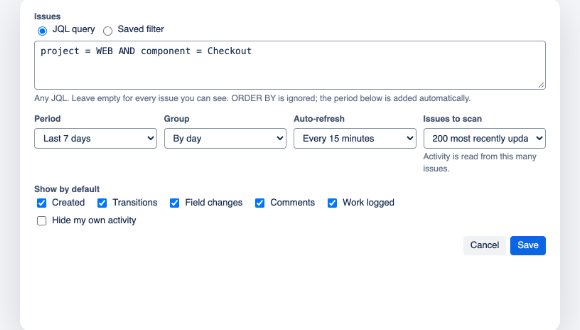
Choose JQL query and type any JQL (for example project = WEB AND component = Checkout), or choose Saved filter and pick one. The JQL is checked before it is saved.
Gadget settings: JQL or saved filter, period, grouping and refresh.
Pick the period (24 hours to 30 days), grouping (by day, by issue or a timeline), auto-refresh and how many issues to scan, then Save.
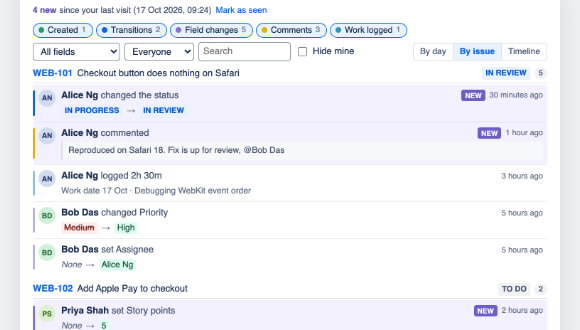
Use the coloured chips to show only some kinds of activity, narrow to one field or person, tick Hide mine or search the text. Export CSV downloads what you see.
The feed grouped by issue.
Limits, to be upfront
Each refresh reads up to 500 issues (you set 50 to 500), the most recently updated in the period. A notice appears when there are more.
For very busy issues the oldest changes in the period can be cut off; a notice tells you.
The "new since your last visit" highlight is kept in your browser, so it is per browser.
Everything is read with the viewer's own permissions, so two people can see different feeds.
StreamPulse for Jira is built on Atlassian Forge, runs on Atlassian and is free for up to 10 users. Full instructions are in the StreamPulse for Jira help.
Questions
Can the Jira Activity Stream gadget use a saved filter?
No. It filters by project, user, issue key and date but not by JQL or saved filter (JRACLOUD-19155).
Can I export the activity to CSV?
Yes. StreamPulse exports the events that match your current filters, in a format Excel opens correctly.
Does StreamPulse store my data?
No. It reads Jira in the viewer's browser with their permissions, stores nothing of its own and makes no calls outside Atlassian.
How much does StreamPulse cost?
It is free for up to 10 users; larger sites pay per user through the Atlassian Marketplace.
We make StreamPulse for Jira, so we've stuck to what you can check: the feature request on jira.atlassian.com, the app's listing and its help page. Facts checked 8 November 2026. Support: support@puzaricloud.in. Not affiliated with Atlassian.