AI code review in VS Code with a local Ollama model (no account, nothing leaves your machine)
Step by step: install Ollama, pull a coding model, and review your uncommitted changes inside VS Code with findings in the Problems panel. Which models to try, how long it takes on real hardware, and where a local model falls short.
Most AI review tools for VS Code want an account first and then send your diff to their own servers. If the code is under an NDA, belongs to a client, or you just do not want another sign-in, that is a non-starter. A local model avoids all of it: the diff goes from the editor to a process on your own machine and stops there.
This guide sets that up with Ollama and our extension, AI Code Review. The local-model path is part of the free version, needs no account and no key, and has no request limit. We wrote the extension, so read the limits section at the end as carefully as the rest.
What you need
- VS Code 1.90 or newer (VSCodium, Cursor and Windsurf use the same extension from Open VSX).
- Ollama installed, and enough memory for the model you pick. A 7B model in the default 4-bit quantisation is a download of roughly 5 GB and wants about 8 GB of free RAM or VRAM.
- A git repository with some uncommitted changes.
1. Install Ollama and pull a model
Install Ollama from ollama.com/download, then pull a coding model:
ollama pull qwen2.5-coder:7b
ollama list          # the model should be listed
curl http://localhost:11434/api/tags   # Ollama answers on port 11434
qwen2.5-coder:7b is the extension's default for Ollama, so with that model there is nothing more to configure.
2. Install the extension
Search for AI Code Review - GPT, Claude, Gemini, DeepSeek, Ollama in the Extensions view, or install it from one of the listings:
- VS Code Marketplace
- Open VSX (VSCodium, Cursor, Windsurf)
There is no sign-in step after installing.
3. Point it at Ollama
Open the Command Palette and run AI Code Review: Choose AI Provider and Model.
- Pick Ollama (local). It is marked "free, no key".
- Keep the base URL
http://localhost:11434unless Ollama runs on another machine. - Pick the model. The list offers
qwen2.5-coder:7b,qwen3:8b,llama3.2,deepseek-r1:8bandgemma3:4b, and Type another model name… takes anything you have pulled.
Then run AI Code Review: Test Connection. The first call loads the model into memory, so it can take a minute. If the model is missing, the error tells you the exact ollama pull command.
4. Review your changes
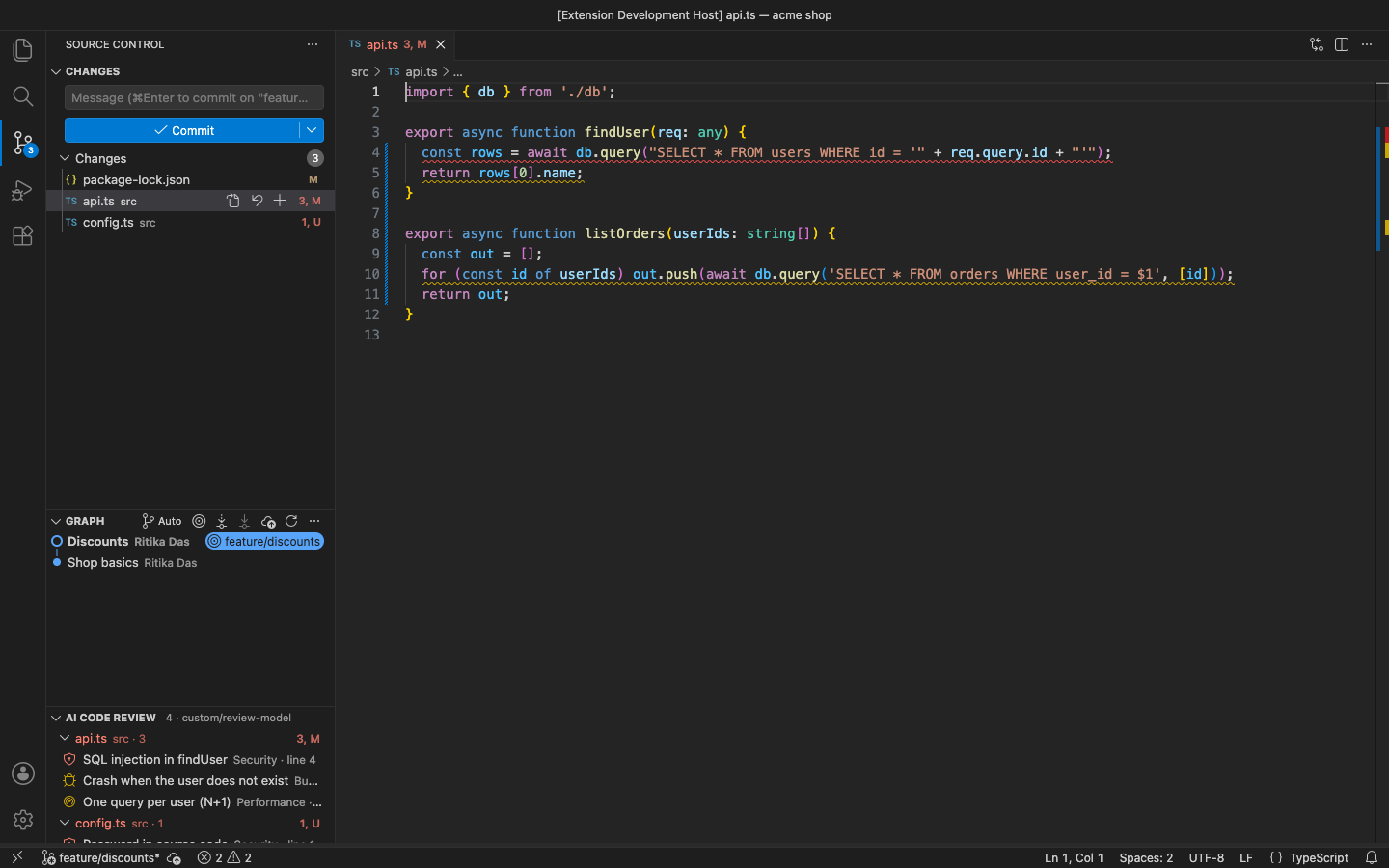
Open the Source Control view and press the Review Uncommitted Changes button in its title bar. You can review everything (staged, unstaged and new files) or staged changes only. For a single file or a selection, use the editor context menu.
Findings arrive in three places:
- squiggles in the editor, with the explanation and the suggested fix on hover,
- the Problems panel, each with a category: security, bug, performance or style,
- an AI Code Review tree under Source Control, grouped by file.
A finding that is wrong for your code base can be ignored with a quick fix, and it stays away in later reviews.
Which model
Review quality tracks model size closely. A fair starting table:
| Machine | Try | Notes |
|---|---|---|
| Laptop, 8 to 16 GB RAM, no GPU | qwen2.5-coder:7b with the quick profile |
Slow but usable for small diffs. This is the class we tested ourselves |
| 12 GB or more of VRAM, or Apple Silicon with 24 GB or more | qwen2.5-coder:14b |
About a 9 GB download |
| 24 GB or more of VRAM | qwen2.5-coder:32b or another large coding model |
About a 20 GB download |
The two larger rows are sizing advice, not our own benchmark: bigger models generally miss less and invent less, so use the largest one your machine runs at a speed you can live with. Reasoning models such as deepseek-r1:8b work too, but they think before they answer, so they are slower for the same diff. The model name is free text: whatever ollama list shows can be typed in, including models released after this page was written.
Settings that matter for local models
{
  "aiCodeReview.provider": "ollama",
  "aiCodeReview.model": "qwen2.5-coder:7b",
  "aiCodeReview.profile": "quick",
  "aiCodeReview.maxTokensPerRequest": 6000,
  "aiCodeReview.timeoutSeconds": 300
}
- profile:
quickreports only bugs and security problems, at most five per file. Small models stay more accurate when they are asked for less. - maxTokensPerRequest: the default is 12000. Lower it for small models; large changes are then split into more requests instead of being cut off.
- timeoutSeconds: local providers already get three times the configured value.
- The extension sets Ollama's context window (
num_ctx) per request to fit the prompt, between 8192 and 32768 tokens. Ollama's own default is often smaller and would silently drop the start of a long diff.
How to check that nothing leaves your machine
You do not have to take our word for it.
- The only address the extension calls is the base URL you set,
http://localhost:11434. There is no telemetry, no account and no licence server: the Pro key is verified offline. - Once the model is pulled, turn Wi-Fi off and run a review. It still works.
- Watch outgoing connections with Little Snitch, LuLu or
sudo lsof -i -P | grep -i codewhile a review runs.
If Ollama runs on another box in your network, set the base URL to that host. The diff then travels to that machine and nowhere else.
Honest limits
- Speed. In our own test on an Intel MacBook Pro without a usable GPU, an 8B model needed 67 seconds to load and 165 seconds to review a 15-line change. It found both planted problems (an SQL injection and an unchecked undefined value). A GPU or Apple Silicon is far quicker, but a local review is something you start and come back to.
- Small models miss more and invent more. Expect some false positives from 7B and 8B models. A current mid-size cloud model finds more.
- The model sees the diff, not the repository. It cannot know that a helper three files away already validates the input.
- It is a second pair of eyes. It does not replace a human reviewer or your tests.
When your own API key is the better choice
If the code may leave your machine but you still do not want a vendor account in the middle, the same extension talks directly to OpenAI, Anthropic, Google Gemini, DeepSeek, Mistral, Groq, xAI, OpenRouter or Azure OpenAI with your own key. The request goes from your editor to that provider and to nobody else, and you pay the provider for the tokens. The estimate is shown before a large review is sent. One cloud provider is included in the free version.
How this compares with the account-based tools is in Bito vs Sourcery vs CodeRabbit vs Qodo vs bring-your-own-key AI code review.
FAQ
Is it free with Ollama? Yes. Reviews of uncommitted changes, files and selections with local models are in the free version, without a limit. Pro ($19 a year or $57 once) adds branch review, apply fix with a diff preview, team rules in a .ai-review.md file and Markdown export.
Does it work with LM Studio or llama.cpp? Yes. Pick LM Studio (local), or Any OpenAI-compatible endpoint for llama.cpp, vLLM or LiteLLM, and enter the server URL.
Is there a JetBrains version? A plugin with the same core for IntelliJ-based IDEs is in JetBrains Marketplace review at the time of writing.
Questions or a model that misbehaves: support@puzaricloud.in.
More guides
- Bito vs Sourcery vs CodeRabbit vs Qodo vs bring-your-own-key AI code review in VS Code
- The London outage of 20 October 2026: nine status pages, one Google Cloud zone
- How to monitor PostgreSQL connections, cache hit ratio and replication lag (and get paged before it hurts)
- See every API your server calls (and every call it receives) without changing a line of code